
Expense management for clubs, charities & small teams
One price for your whole organisation.
Not one price per person.
Expense submissions, approvals, AI receipt scanning and a full audit trail — from €9/month for your entire team. Most expense tools charge that per user, per month.
Free to start · Unlimited users on every plan · No credit card required
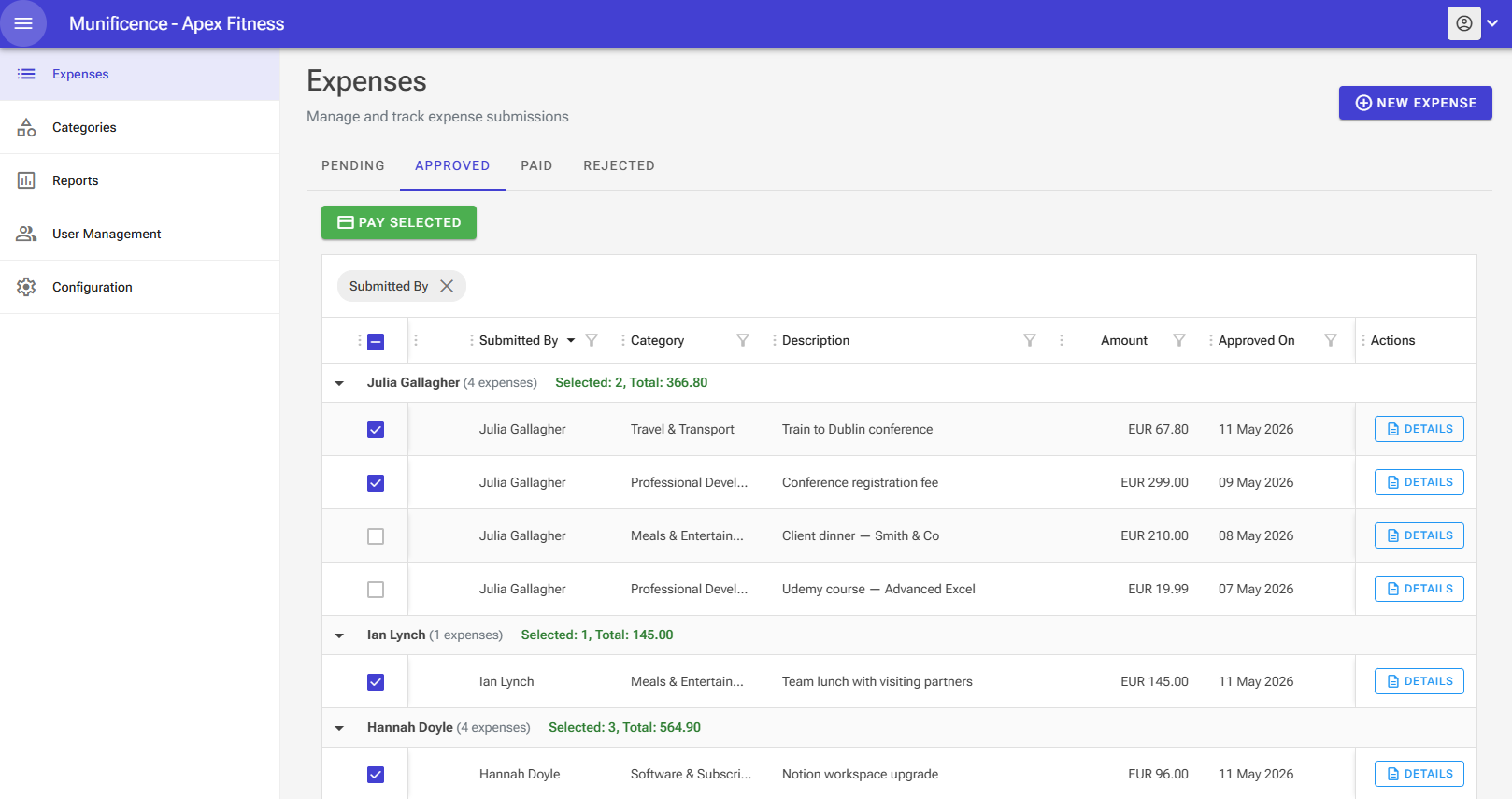
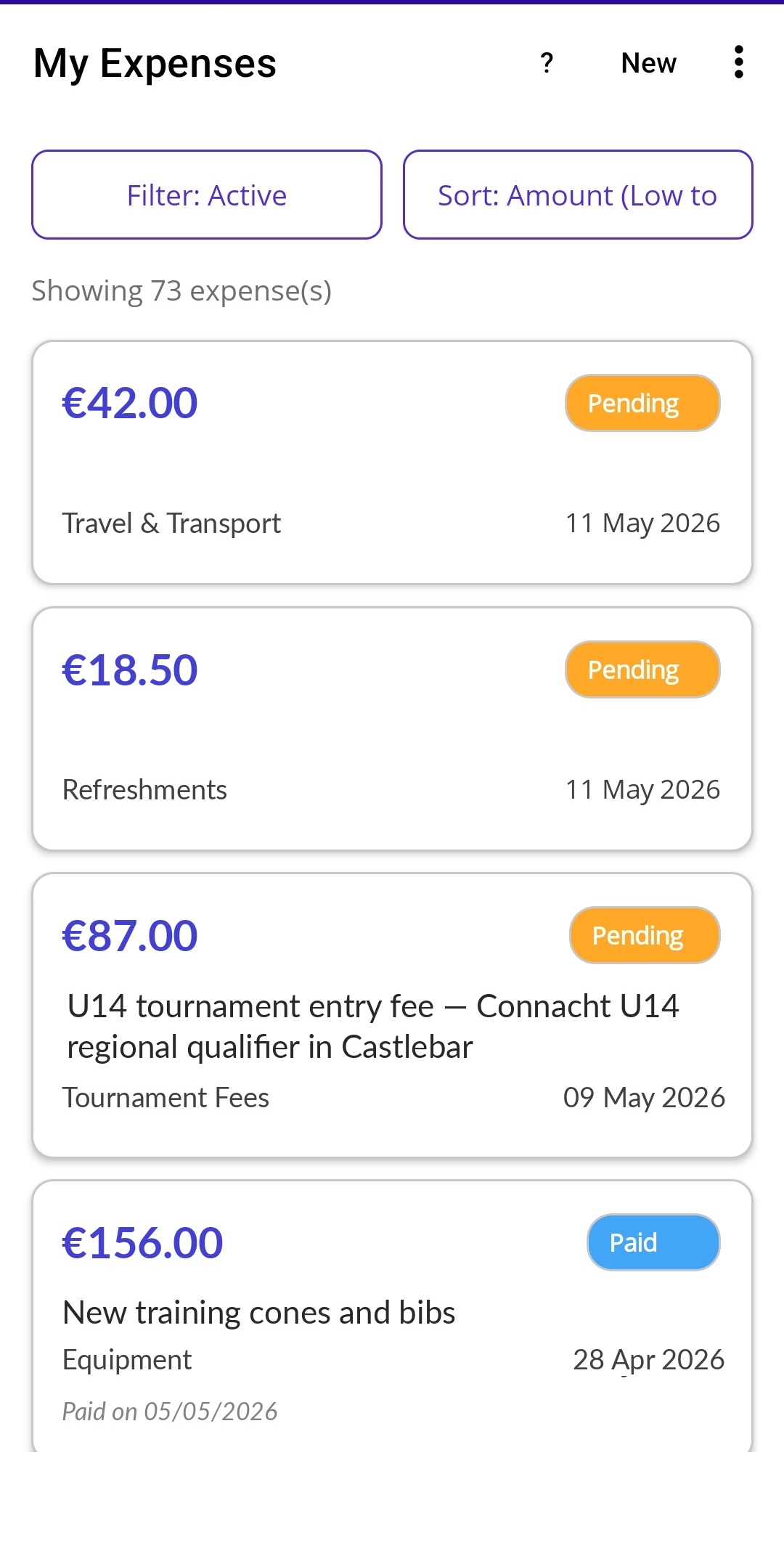
One workflow, two surfaces. Treasurers approve and pay from the web. Members submit on the go from the mobile app.
Why per-seat pricing punishes small organisations
In most clubs and charities, a handful of people claim expenses constantly and everyone else submits two or three a year. Per-seat pricing charges you full price for both. We don't count heads — we charge per organisation.
Munificence
€9/mo
Starter — whatever your headcount
Typical per-seat tool
€150/mo
25 people × €6
You'd keep €1,692 a year.
An estimate — your plan depends on how many expenses you log each month, never on how many people you add. The per-seat range reflects publicly listed pricing from major expense-management providers as of July 2026; adjust the slider to match whichever tool you're comparing. See full pricing for what each plan includes.
The spreadsheet method breaks down
Receipts arrive by email. Photos come via WhatsApp. Someone retypes it all into a spreadsheet, approvals happen in chat threads, and nobody is sure which version is correct. Munificence replaces that patchwork with one auditable system.
Every action logged
Who submitted, who approved, and when — on every claim.
Encrypted in transit
Receipts and records stored securely, access scoped to your organisation.
Your data stays yours
Export your records whenever you want. No lock-in.
Free to start
No credit card, no trial countdown, no sales call.
Munificence is new, and we'd rather say so than invent logos. Try the free plan and judge the product on its own terms — there's nothing to cancel if it isn't for you.
How it works
1. Submit
Members submit expenses through the web app or the optional mobile companion app.
2. Review & Approve
Treasurers or managers review, approve or query submissions inside a structured workflow.
3. Track & Archive
Every action is recorded. Status changes trigger notifications. All records remain searchable and secure.
Snap a receipt. AI does the rest.
Take a photo of any receipt and our AI instantly extracts the amount, date and description. Review the details, hit submit — done in seconds, not minutes.
Free plan includes 5 AI scans per month to try it out. Starter and Pro plans include 250 and 1,000 AI scans per month respectively.
Snap or upload
Take a photo of your receipt using the mobile app, or upload an image from the web dashboard.
AI extracts the details
Amount, date and description are read automatically. Currency mismatches are flagged so nothing slips through.
Review and submit
Check the pre-filled fields, pick a category, and submit. Your treasurer gets notified instantly.
Add your whole committee. The price doesn't move.
Every plan includes unlimited users and the mobile app. Free to start, no credit card, no time limit.
A free mobile app for your whole team
Munificence Submit is available on Android and iOS at no extra cost — even on the free plan. Your team can submit expenses on the go, and everything syncs to the web dashboard where admins manage approvals, reporting and audit trails.
Built for real operational control
Structured workflow
Clearly move expenses from submitted → approved → paid.
Full audit trail
See who did what and when. No ambiguity.
Email notifications
Approvers are emailed when new expenses are submitted, and submitters are emailed when their expense is approved, rejected or paid.
Receipt requirements
Set per-category rules — require a receipt, accept a description in its place, or make both optional. Build financial controls into your workflow.
One price per organisation. Never per user.
Every plan includes the full expense workflow, mobile app, approvals, audit trail and reporting. Add your whole team at no extra cost — you're only ever charged for the plan, not the people on it.
Free
€0
for the whole organisation
Full expense management for your team — no credit card, no time limit.
- Unlimited users
- 50 expenses / month
- 10 AI scans / month to try it out
- Mobile app on Android & iOS
- Approvals, audit trail & reporting
Starter
€9/mo
for the whole organisation — 36c per person at 25 people
AI receipt scanning for growing teams. Snap, scan and submit in seconds.
- Unlimited users
- 250 expenses / month
- 250 AI scans / month
- Mobile app on Android & iOS
- Approvals, audit trail & reporting
Pro
€19/mo
for the whole organisation — 19c per person at 100 people
For busier organisations with higher volumes. Room to grow.
- Unlimited users
- 1,000 expenses / month
- 1,000 AI scans / month
- Mobile app on Android & iOS
- Approvals, audit trail & reporting
- Priority support
Logging more than 1,000 expenses a month? We can put together a plan that fits. Contact us →
Frequently asked questions
How is your pricing different from other expense tools?
Most expense platforms charge per user, per month. If 40 people in your club might claim an expense, you buy 40 seats — even though most of them submit two or three claims a year. We don't count people at all. Every plan includes unlimited users, and you pick a plan based on how many expenses your organisation logs each month. Adding someone never changes your bill.
What happens if we go over our monthly expense limit?
You'll be prompted to move up a plan. Nothing is deleted and no data is lost — you keep every record, and moving between plans takes seconds. If you log more than 1,000 expenses a month, get in touch and we'll build a plan around you; it stays priced per organisation, not per seat.
Who is Munificence for?
Any organisation that needs to collect, approve and track expense claims. If you're currently using spreadsheets, email or WhatsApp to manage expenses, Munificence replaces that with a proper workflow — and your team can submit from a free mobile app.
Do my team members need to install the mobile app?
No. Members can submit expenses through the web app on any device. The mobile app is optional — it makes receipt scanning and on-the-go submissions faster, but it's not required.
How does the AI receipt scanning work?
Take a photo of a receipt or upload an image. Our AI reads the receipt and automatically fills in the amount, date and description. You review the details, choose a category, and submit. It works on both the web app and the mobile app. The free plan includes 5 AI scans per month so you can try it out; Starter and Pro plans include 250 and 1,000 AI scans per month respectively.
What happens when I hit the free plan limits?
The free plan includes unlimited users, 50 expenses per month and 10 AI scans per month. If you need higher volumes, you can upgrade to Starter (250 of each per month) or Pro (1,000 of each per month) at any time — no data is lost and there's no interruption. You can also downgrade back if your needs change.
Is my data secure?
Yes. All data is encrypted in transit, receipt images are stored securely, and every action is recorded in an immutable audit log so you always know who did what. Only authorised users from your organisation can access your records.
Can I try it before committing?
Absolutely. The free plan requires no credit card and no time limit — use it as long as you like, with unlimited users and 50 expenses per month. You also get 10 AI scans per month to experience the receipt scanning. When you're ready for more, upgrading takes seconds.